| My Credits include: |
|
|
ZAPP has me listed (top of the
list) as someone
who can prepare your images and recommends me to the art shows when they
ask for help.
 |
They also have a link to our Photoshop tutorial tips page. It's the same
tutorial page most of the participating art shows have linked to in
explaining how to prepare digital jury images |
|
|
| Scanning to match artwork for years to create over
150 artist web sites |
|
| Juried Art Services had me write an
article on the jury system used by the Smithsonian Craft Show |
|
| Responsible for the square image format used by
ZAPP, which is fair for all artists |
|
| Beta tests Adobe Photoshop |
|
| Writes for Shutterbug Magazine |
|
|
|
|
|
| Testimonials from
some of the over 2,000 artists I've prepared images for
|
|
| I believe that nothing is as important as the
images you submit for jurying, whether it be 35mm slides or carefully
prepared digital files.
We can provide you with the highest quality images
at the specified file size and resolution that each different jury
process requires. |
|
|
My
Services
Send me your slides to scan
Turnaround time is usually 24 hours
I can also upload your images to ZAPP and apply for you
Questions: Larry's
Art Show
Schedule 412-401-8100 or
e-mail |
|
Send your slides to:
(or use my Russellton PO Box address below) |
Scanning your slides
I use the top of the line Nikon 35mm film scanner which scans at 4000 pixels
per inch and produces a file of approximately 50-60 megabytes.
I also have the capability of scanning 4x5 transparencies. What we're offering to do for artists is to provide a set of color matched
images that are properly sized and prepared as Jpegs for the any digital
jury system. We can also set up your profile with ZAPP and upload your
images. I archive
the original full size color corrected scans so other size image files,
like for other digital jury systems, can
be ordered in the future. As we start getting closer to jury deadlines, please call
412-767-8644 or e-mail to
make arrangements to send your slides. Calling is preferred because it's a faster way to contact
me.. |
| If you're planning on
having a local lab scan your slides, make sure that color correction,
cropping and specific sizing (with canvas if for ZAPP) is part of the price that they quote you.
Just providing you with raw scans is of no value if you don't have the
skills to prepare the image files yourself. If you did have the skills,
you wouldn't need to have them scan the slides to begin with. |
| Images prepared for ZAPP, Smithsonian and other
similar digital jury systems
$20 per slide/digital file now
includes formatting for both ZAPP and JAS |
|
| Set up a profile with ZAPP and upload your images
$20 to upload all the images and set up the basic profile if
necessary. I provide the instructions for you to add names and descriptions for each image and check the
accuracy of the information. I'm only responsible for the image
preparation. This is a great
time saving factor if you're on a dial up connection or new to ZAPP.
|
|
| Images prepared for 35mm
slides
$20 per slide/digital file, or in conjunction with the
ZAPP/JAS for an additional $5
per image. I prepare your digital files, optimizing them for 35mm slides
and upload the images to
IPrintFromHome.com |
|
| Digital Projection
Test projection of your own digital images
I
have the same system that the art shows use for projection jurying. A
Dell 4100MP digital projector
and the
Roku
media player
that sends the images to the digital projector. |
|
| Summary of imaging fees
$20 for each image
prepared for both plus ZAPP and JAS and $5 per image additional to
format for 35mm
slides.
$20 one time fee to process the order which includes archiving the image files, creating a CD for you and return shipping. $20 optional to set up your
profile and upload your images. $20 to apply for you, if I have the
necessary information in advance. |
|
|
|
|
|
What makes my services a
good value.
Larry has been involved in beta testing for
Adobe Photoshop for more than four years. He's been
scanning to match artwork for over six years for the web sites he's built
with Chris Maher. All slides are scanned and worked on at full resolution. We
give you the properly prepared and sized Jpeg based on the digital jury
requirements. We maintain a back up DVD of all work files in the event that the images need to be
changed in the future. And lastly, we believe in sharing the
information necessary for you to do it yourself if you're capable. In
keeping with this theory, Larry also started doing a
series of seminars to help
educate artists in preparing great digital jury images.. |
Consulting to both art shows and to artists
In 2000 we created the first experimental digital
jury system at
www.ArtShowJury.com. |
|
Slide or Digital File Submission Tips |
|
Don't forget to send your booth slide.
Please make sure slides are labeled as to top and front. A
red dot on the bottom left corner would be fine and prevent confusion.
Original slides will produce higher quality scans than duplicates. Please
provide a link if you have images on the web that you want me to match.
You can also provide material samples for color match. |
|
Digital Jury Image Preparation
System
preparing the images on a color calibrated system
and testing them by digital projection |
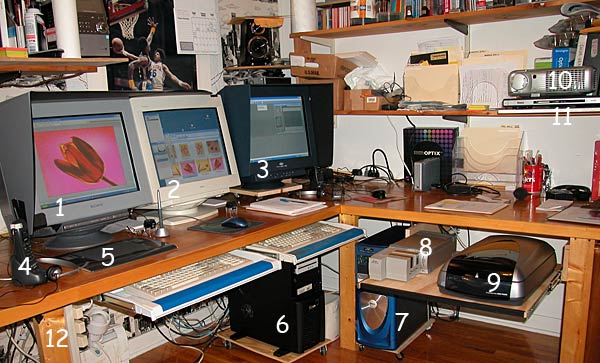
Click here for
a detailed list of all the components of my digital imaging office
updated September 2005 |
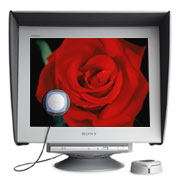 I
purchased a Sony Artisan monitor (review) for Photoshop. It comes with it's
own color calibration system and is considered the reference monitor within the
graphics arts industry. Besides the dual 21" monitor computer system for
Photoshop, I use the Roku HD1000 and Dell 4100MP digital projector to
test project the images I've prepared for the ZAPP digital jury system. I
purchased a Sony Artisan monitor (review) for Photoshop. It comes with it's
own color calibration system and is considered the reference monitor within the
graphics arts industry. Besides the dual 21" monitor computer system for
Photoshop, I use the Roku HD1000 and Dell 4100MP digital projector to
test project the images I've prepared for the ZAPP digital jury system. |
 |
|
What You Can Do To Prepare Right
Now |
|
I'm
starting a series of seminars on digital image preparation |
| There have been numerous discussions about
how artists aren't prepared for a digital jury. But they seem to forget
that this has been in the works for at least four years. We
created an experimental digital jury web site in October 2000, and at the time
were informed by the director of the Cherry Creek Arts Festival that a
Denver organization (Westaf) was working along similar lines and would be
proposing their own variation of a digital jury system. This was posted to
the NAIA forum (when it was still an open forum) but a lot of artists
chose to ignore it and have kept their heads in the sand hoping it would
go away. But the future is here now. What we can do is offer a few
guidelines as a starting point for your learning process, understanding
that it's not mandatory for you to learn anything new as there will be artists like us,
and other professionals, that will be offering to prepare your images for
you. |
| If you're taking slides of your work to
submit for jurying, make sure to either shoot multiple in camera originals or
save the originals for scanning. This is critical as
duplicate transparencies have an increase in contrast which means loss of highlight and
shadow detail. If you just received a digital camera for Christmas, now
would be the time to learn how to get high resolution digital files from
it. A few tips on taking good photographs. Always use a tripod. Be aware
of elements in your pictures that don't belong. Keep it simple. Use
flattering lighting. Understand that shooting digitally is no less
difficult than shooting film and hire a professional if you don't think
you can create the best photographs of your work. |
| If you're shooting digital files, make
sure to use the highest resolution setting that your camera is capable of
in an uncompressed mode.
If you're scanning your original slides, make sure to do high resolution
scans. I scan slides at 4000 pixels per inch which creates a 60 megabyte
file. Do not use a slide copying attachment for your flatbed scanner as that
won't give you enough detail in your image for jurying. Ask questions if you don't
understand. All of your image preparation should be at full resolution of
the captured file and saved. That way it can be resized in the future based on the
requirements of any of the different digital jury processes or any other
uses you might have for the images, like catalog reproduction. |
| Bottom line is that everyone who wants to
be proactive in the process needs to learn how to create the best quality
images with their
native digital camera files or scanned slides. You need to learn how to create
72 pixel per inch Jpegs at the required file size and pixel dimensions of
the art show's system that you want to apply for. |
|
Recommended Programs and Links |
|
|
|
My Credentials |
|
We wrote a
description of the Smithsonian Craft Show digital jury system
for the Smithsonian web site. |
Larry Berman
LarryBerman.com
His career in photography spans 30 years,
beginning as a staff photographer for the ABA New York Nets and he has
spent 20 years with The Image Bank stock photo agency. His original
photographic prints have been exhibited and sold at national fine art
shows for over 25 years. Working with Chris Maher, he has created over 100
fine art web sites, built an early working model of an experimental online
digital jury system and wrote an article for the Smithsonian web site
describing the digital jury system used for the Smithsonian Craft Show.
Together they also wrote the book "50 Fast Digital Camera Techniques"
(Wiley Publishing) and share a byline writing about photography and
imaging technology for Shutterbug Magazine. Active on numerous forums
where he answers questions about traditional and digital photography, web
design and Photoshop, Larry has been involved in beta testing for major
digital imaging software companies including
Adobe Photoshop and the
ACDSee image viewing
program for more than three years. His current
photographic work is digital color infrared and has been featured in three
books, including the best seller "Mastering Digital Printing" by Harald
Johnson. |