|
 |
|
|
|
|
|
More Tips |
|
Dual Monitor Computer with a Wacom Tablet
for working on Graphics |
|
In
January 2005 I purchased the
Sony Artisan Reference Monitor |
| September 2005 |
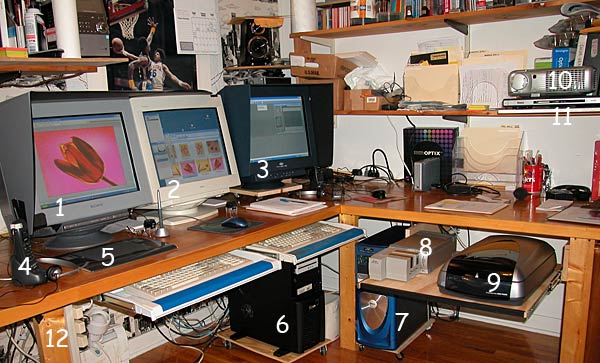 |
| (1) Sony Artisan Reference monitor
as part of a dual 21" monitor system with a (2) Dell Sony 1620
monitor connected to a new (6) 3.4 GHg computer with 2 Gigs ram and
an PCI Express ATA Radeon X800XL graphics card with 256 megs of video ram.
My two year old Dell 2.8 GHg computer (7) now dedicated to scanning
with the (8) Nikon CoolScan 5000ED and (9) Epson Perfection
4870 flatbed scanner on a shelf that pulls out from under the desk.
Finding LCD monitor difficult, if not impossible to calibrate. I was able
to find one of the last (3) LaCie 22" Electron Blue CRT monitors
which runs through a Radeon 9800 Pro graphics card with 128 megs of video
ram. |
| Additional components are (4) 800
MHz cordless telephone with headset. 800 MHz so it doesn't interfere with
my wireless network and a headset so I can continue working while
answering the phone. (5) Wacom Intuos 3 USB graphics tablet.(10)
Dell 4100 MP digital projector and (11) Roku media player for test
projecting problem scans. That the same projection equipment that
ZAPP uses for
digital jurying. (12) is a three light power switch under the desk
that controls a keyboard light for working in the dark, a light box (not
shown because it's off to the left side) and a ceiling light behind the
monitors that point up so as not to affect the image. For most graphics
work, I keep the windows covered and lights out. That's how I calibrate
the monitors so the images view accurately on the Sony Artisan. |
| Also in the picture but not numbered is a
series of IDE hard drive in USB2 enclosures behind the LaCie, The Monaco
Optix XR calibration system and a Western Digital 320 Gig USB2 backup
drive. Between the computers on the floor is a heavy duty UPS that powers
all three monitors and two computers if the power is interrupted. Both
computers are on rolling platforms so they can be accessed easily. |
|
More Tips |